In Midwest fabrication shops, I see retrofit vs replace decisions made under pressure, usually when a control is the bottleneck and the schedule is already tight. The most common failure I walk into is downtime risk that nobody modeled: a control that randomly faults, parts that are obsolete, and a team that is afraid to touch it because one wrong change can stop production. When you guess payback, you miss the operational reality of changeovers, setup recovery, and the human side of adopting a new workflow.
Why Payback Guessing Fails in Retrofit vs Replace Decisions
Payback guessing usually assumes stable uptime and linear savings, but real shops have variability: unplanned downtime, uneven operator skill, and scheduling constraints that punish missed ship dates. I have watched teams “win” a payback argument on paper, then lose weeks to debug time, tuning, and re-qualifying parts because the scope was not defined to the I/O point level.
The practical fix is to replace payback guesses with a repeatable baseline: capture current downtime minutes by cause code, setup and changeover time by job family, scrap and rework by feature type, and the true maintenance time per month. When you quantify those inputs, you can forecast outcomes in hours recovered, fewer touchpoints per part, and reduced scrap variance instead of hoping the number works out.

AUTOMEC CNC BACKGAUGE CONTROL SYSTEMS
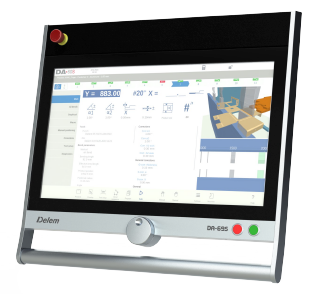
DELEM DA-69S
Delem DA-69S Press Brake Control
Advanced 3D Graphical Control for High-Precision Bending
Mac-Tech proudly offers the Delem…
Decision Criteria That Matter Downtime Risk, Scope, Adoption, and TCO
Retrofit vs replace is rarely about fastest theoretical ROI; it is about reducing operational risk while improving throughput and repeatability. The decision gets clearer when you separate what the machine structure can still do (iron, ways, spindle/drive health) from what the control layer is preventing (programming time, alarm recovery, unreliable I/O, slow setup routines).
Decision criteria to document before pricing:
- Downtime exposure: mean time between faults, parts availability, and alarm recovery time per event
- Retrofit scope: control, drives, motors, feedback devices, safety circuit, pneumatics, and I/O mapping
- Operator adoption: HMI differences, program transfer method, probing cycles, and setup workflow changes
- Total cost of ownership: service hours, planned maintenance, energy use, and supportability over 5 to 10 years
A workable process step is to run a structured walkdown with maintenance, production, and one lead operator to validate what must change and what must stay. In integration projects at Mac-Tech, this is where we prevent “scope drift” that turns a retrofit into a science project and protect uptime with a phased cutover plan and documented rollback points.
Adam Quoss ROI Model for Control Upgrades vs Full Machine Replacement
My ROI model compares retrofit and replacement using the same four buckets: cash outlay, downtime risk, throughput gain, and support horizon. Retrofit can win when the mechanical platform is strong and the control is the constraint; replacement can win when accuracy, speed, or reliability is limited by mechanical wear, unavailable components, or safety compliance gaps.
The practical fix is to model two timelines: implementation downtime (planned) and risk-adjusted downtime (unplanned) over the next 24 months. A control upgrade often improves repeatability and recovery time by standardizing alarm handling, simplifying program management, and enabling faster setup routines, which can cut setup and changeover by measurable chunks like 15 to 45 minutes per job depending on complexity. For teams evaluating control options or integration components, we often reference standard retrofit-ready hardware and accessories that reduce commissioning time and stabilize supportability, such as what you can source through https://shop.mac-tech.com/.
How to Score Retrofit and Replace Options with a Comparable ROI Framework
To avoid apples-to-oranges comparisons, score both options with the same inputs and weightings, then convert the score into dollars and hours. I recommend a simple 100-point scorecard that forces clarity on what matters most to your shop: schedule risk, training time, process capability, and long-term maintenance burden.
Comparable scoring categories (example weights):
- Uptime confidence (30): planned downtime days, fault recovery time, parts availability, service response
- Capability impact (25): cycle time, accuracy/repeatability, probing/automation readiness, changeover speed
- Adoption effort (20): training hours per operator, program conversion effort, interface complexity, SOP updates
- Cost horizon (25): capital, install, software licensing, maintenance hours, and expected support life
The practical fix is to run a pilot assumption set: define one representative part family and map the touchpoints from programming to first-article approval. Then estimate hours saved per week from faster setups, fewer restarts, fewer edits at the machine, and reduced rework loops, and multiply by your constrained resource rate (not a generic labor rate). If you want to tie ROI to quoting and routing discipline, tools that connect planning data to execution can help, and for some shops a supplemental workflow layer like https://vayjo.com/ is useful when the bottleneck is data handoff rather than machine motion.
Next Steps for Modern Fabricators as H2 headings (##)
Start by building a one-page baseline: current OEE or uptime, top three downtime causes, average setup/changeover by family, and monthly scrap or rework hours tied to specific operations. This takes a week of disciplined capture, but it replaces debate with numbers and usually reveals whether the constraint is control recovery, programming bottlenecks, or unstable hardware.
Next, define retrofit scope or replacement requirements at the interface level: I/O list, safety architecture, program formats, network needs, and tool/probe routines that operators actually use. When Mac-Tech is brought in early for install and training planning, we can reduce commissioning uncertainty with a documented acceptance test, operator sign-off checkpoints, and a training plan that targets fewer first-week escalations and faster onboarding for new hires.
FAQ
How do I calculate ROI without guessing payback?
Use a baseline of downtime minutes, setup/changeover time, and scrap/rework hours, then model hours recovered and risk-adjusted downtime over 12 to 24 months.
How long does operator training take for a control retrofit vs a new machine?
Plan on targeted training in short blocks tied to real jobs; retrofits often reduce learning time if workflows match current practice, while new machines can add process changes that extend ramp-up.
When is replacement the smarter move than a retrofit?
If mechanical wear, accuracy limits, or obsolete drive components dominate your downtime and quality losses, replacement typically lowers risk and improves capability more reliably.
Will my existing tooling, probes, and programs work after a retrofit?
Often yes, but you need a defined program conversion and validation plan, plus confirmed compatibility for feedback devices, safety circuits, and peripheral I/O.
How do I manage uptime risk during installation?
Use a phased cutover with a tested rollback point, pre-built documentation for I/O and parameters, and an acceptance test that proves critical cycles before full release.
What maintenance changes after a control upgrade?
You usually trade unpredictable legacy faults for planned service intervals, better diagnostics, and more accessible replacement parts, which reduces emergency hours and improves repeatability.
If you want to walk through your retrofit vs replace scorecard on one representative part family, email me at aquoss@mac-tech.com or start here: https://shop.mac-tech.com/contact/
Get Weekly Mac-Tech News & Updates