
In the Midwest fabrication shops I’m in every week, multi-machine cells are the fastest way to gain capacity without adding headcount, but they can also be the fastest way to lose control of consistency. I’ve watched the same part run clean on first shift and then slowly drift into rework on second shift because the handoffs between programming, setup, and inspection weren’t truly connected. The most common bottleneck is programming and setup changeovers multiplying across machines, until the cell becomes a collection of one-off “tribal knowledge” processes instead of a repeatable system.
Why Multi-Machine Cells Drift Across Shifts and Machines
Drift usually starts with good intentions: one programmer posts a job, another makes a “quick tweak,” an operator adjusts a tool offset to hit a dimension, and inspection compensates with a different sampling plan. In shop terms, you end up with three versions of the truth: the program on Machine A, the setup sheet in a binder, and the inspection notes on a clipboard, and none of them match by Friday. The result is predictable: extra touches, longer changeovers, surprise scrap, and onboarding that depends on who happens to be working that day.
Common failure points:
- Duplicate programs saved locally at the control with the same job name but different rev levels
- Tool libraries that differ by turret/station mapping, gauge line assumptions, or holder stick-out
- Offline inspection rules that are not revision-controlled to the part program and setup
- Manual offset “fixes” that never get fed back into the approved source program
The fix is not more discipline, it’s architecture: treat programs, tooling definitions, and inspection logic as controlled data with ownership, revisioning, and automatic distribution. When that system is in place, it’s realistic to cut setup variance by 30–50%, reduce first-piece approval cycles from hours to minutes, and eliminate most “mystery rework” tied to shift changes.
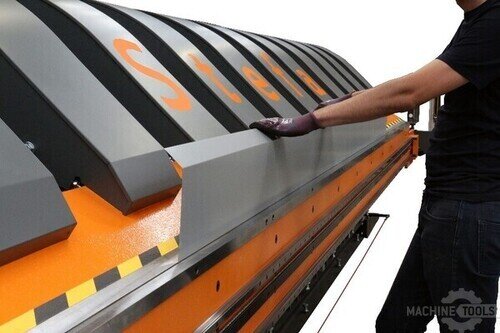
STEFA VH315
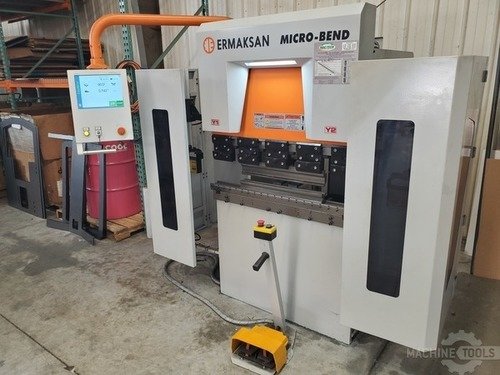
ERMAKSAN MICROBEND
The One Program Source Insight for Zero-Drift Manufacturing
One program source means there is exactly one authoritative origin for the NC program and its connected artifacts (tool list, setup intent, inspection rules), and everything else is a controlled copy. If a change is needed, it gets made once, approved once, and pushed everywhere, rather than being re-created at every machine. That single-source approach is how you keep a 3–8 machine cell behaving like one system instead of eight separate mini-processes.
The practical implementation is a revision-controlled repository paired with a standard post strategy and a locked-down method for edits at the control. Operators can still make offsets and record observations, but they do not create a new “shadow program” as a workaround. In real numbers, this typically removes 1–2 programming touchpoints per job, trims 15–30 minutes per changeover on repeat work, and reduces scrap caused by wrong revision selection to near zero.
When we help shops implement this at Mac-Tech, the limiting factor is rarely the machine’s capability; it’s deciding what is allowed to change on the floor and what must route back through the single source. That clarity, paired with a connected workflow, is what stabilizes output across shifts.
Designing Connected Cell Architecture for Programs, Tooling, and Inspection Rules
A connected cell starts with a shared data spine: the program source, a standardized tool library, and a feedback path that turns inspection results into controlled updates. You want the operator’s view to be consistent across machines: same job number, same revision, same tool callouts, same probing or inspection checkpoints, and the same acceptance criteria. The moment Machine B needs a different tool mapping or different inspection plan, you formalize it as a variant in the source, not as an undocumented deviation.
Cell design controls that prevent drift:
- Central program repository with revision control and machine-specific outputs generated from the same master
- Standardized tool library: holder/insert definitions, gauge lengths, stick-out limits, and station mapping rules
- Digital setup package tied to the program revision: tooling photo/QR, clamp scheme, zero strategy, and warm-up notes
- Inspection rule set linked to program features: sampling frequency, critical dims, and reaction plan for trend drift
The outcome is repeatability you can measure: fewer first-article rejections, tighter Cp/Cpk on repeat jobs, and faster onboarding because training focuses on one workflow instead of “how we do it on this machine.” If you’re building out a cell, standardizing tooling and inspection logic usually delivers the quickest wins because it reduces variation before you even touch cycle time.
For shops needing a practical place to source standardized tooling and accessories during rollout, our online catalog at https://shop.mac-tech.com/ helps keep part numbers and specs consistent across machines and shifts.
Implementation Playbook from Adam Quoss for Multi-Machine Standardization
Start with a pilot family of parts that runs weekly, has clear quality requirements, and touches multiple machines. Lock down naming conventions, revision rules, and who can approve changes, then build the first standardized tool library and setup package around that family. The goal is not perfection; it’s proving that one authoritative source eliminates the back-and-forth and stabilizes first-piece approval.
Next, implement controlled distribution: machines pull the correct revision from the repository, and any floor edits are either blocked or captured as a change request. Tie inspection results to that same job revision so a corrective action updates the source, not just the next shift’s tribal notes. With Mac-Tech installs and training, we focus heavily on the handoff points: who posts, who releases, what the operator can adjust, and how feedback becomes an approved update, because that’s where drift normally re-enters.
Finally, scale by standardizing the cell itself: consistent tool carts, consistent presetting method, consistent fixture approach, and consistent inspection reaction plans. Shops that follow this sequence typically see changeover reductions of 20–40%, a noticeable drop in “operator-dependent” quality variation, and fewer unplanned downtime events caused by wrong tools, wrong programs, or wrong assumptions.
Next Steps for Modern Fabricators to Scale No-Drift Cells
If you want to scale a no-drift cell, begin with a simple audit: how many places can the same job exist (USB, control memory, shared drive, email), and how often do tooling and inspection rules differ by machine. Consolidate to one source, then build controlled outputs and a single feedback loop so every improvement is captured once and reused everywhere. This is the difference between growing capacity and growing chaos.
Set a 30-day target: pick one cell, one part family, and measure baseline changeover time, first-piece pass rate, and rework hours, then compare after the workflow is connected. If you need help defining a realistic tooling standard or sourcing consistent components during rollout, start with https://shop.mac-tech.com/ and align your purchasing to the same library your programmers and operators are using. When you’re ready to connect inspection visibility across teams, a supporting option is https://vayjo.com/ to help centralize quality data and keep reaction plans consistent with the released revision.
FAQ
What ROI should I expect from a one program source approach?
Most shops see ROI through changeover time reduction and rework elimination, often paying back in months on repeat-work environments.
How long does training take for operators and programmers?
Plan on a focused 1–2 week ramp for a pilot cell, with most of the learning tied to the new release, revision, and feedback process.
Can I retrofit this into existing machines or do I need new equipment?
You can retrofit in most cases; the key is controlling distribution and edits, not replacing machines.
How do I reduce uptime risk during implementation?
Pilot on one part family and keep the old workflow as a fallback for a short window, then cut over once first-piece results are stable.
Will this work across different machine brands and controllers?
Yes, as long as you standardize the master source, posts/outputs, and tool/inspection definitions per machine type.
If you want to map your current cell drift points and build a no-drift rollout plan, email me at aquoss@mac-tech.com or connect through https://shop.mac-tech.com/contact/.
Get Weekly Mac-Tech News & Updates
