
Modernizing legacy CNC is not about buying a new control and hoping the rest sorts itself out. I work with Midwest fabrication shops every week, and the pattern is consistent: throughput stalls when programming, setup, and inspection become manual handoffs that nobody owns end to end. The single biggest bottleneck I see is downtime risk during cutover, because parts still have to ship while the shop is trying to learn new workflows.
Why Legacy CNC Upgrades Fail Without a Modernization Scope
Most upgrades fail because the shop scopes only the machine level and ignores the surrounding system that feeds it. In real terms, that means the new control is faster but programming files still arrive by USB, tooling data lives in someone’s notebook, and setups remain tribal knowledge. The fix is to define scope across controls, software, people, and cutover timing before anyone touches the panel, so you reduce unplanned stoppages and protect on time delivery.
Common failure points:
- Control retrofit with no postprocessor validation plan, creating first article delays and scrap risk
- No defined process for revision control, so operators cut old programs or wrong offsets
- Ignoring electrical and network readiness, leading to intermittent communication faults
- Training limited to button pushing, not proving out programs, probing, and recovery routines

MACHMOTION CNC CONTROLS
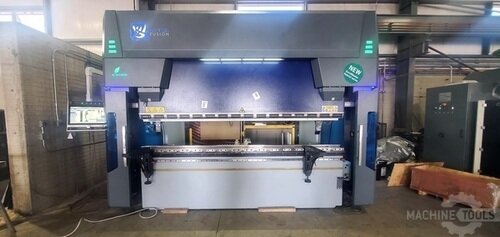
RYTECH FUSION HYBRID B32.135
Scoping Controls, Software, Networks, and Data Flows in Legacy Shops
In shop terms, scope starts with tracing how a job moves: quote to nesting to programming to setup to run to QC to ship, and identifying where data gets retyped or carried by hand. When we scope a modernization, we map the control capability (probing, tool management, high speed lookahead), the CAM and posts, the network path to the machine, and the storage location for approved programs so there is one source of truth. Done correctly, you cut touchpoints, reduce setup variation, and stop losing hours to “where’s the right file” and “why doesn’t the post match the control.”
What to lock down before hardware shows up:
- Exact control options needed (probing cycles, macros, safety IO, part recovery, tool life)
- CAM version and post ownership, with a test part list to validate code and cycles
- DNC or file transfer method, permissions, and folder structure for released vs in-work programs
- Tooling and offset standards (naming, lengths, wear strategy), tied to repeatable setup sheets
For shops building this roadmap, I often point teams to the equipment and integration components we support so the scope includes the real install constraints, not wishful thinking: https://shop.mac-tech.com/.
Adam Quoss Framework for Training Operators, Programmers, and Maintenance
Training has to match roles, because the operator, programmer, and maintenance tech each prevent different kinds of downtime. Operators need repeatable start up, setup verification, probing routines, and recovery steps; programmers need post discipline and prove-out standards; maintenance needs diagnostics, backup images, and spare parts planning. When Mac-Tech is involved in an install or retrofit, we align training to the actual control, ladder, and I/O on that floor, because generic training does not address the failure modes that stop shipments.
Role-based training plan:
- Operators: daily checks, tool touch-off, probing, warm-up routines, alarm recovery, safe restart
- Programmers: post tuning, simulation rules, standardized headers, revision control, test cuts
- Maintenance: backup/restore, drive and feedback checks, I/O verification, network fault isolation
- Leads: changeover checklist ownership, first article signoff flow, and escalation triggers
A practical target is to have operators comfortable within 1–2 weeks on the new workflow, while programmers and maintenance run parallel deeper sessions during the first production jobs so they learn on real parts, not classroom examples. That approach typically cuts onboarding time for new hires by making setup sheets, offsets, and recovery routines consistent across machines.
Phased Cutover Plan to Modernize CNC Without Disrupting Shipments
A phased cutover is the difference between modernization that boosts capacity and modernization that creates a backlog. The shop should keep proven work on legacy equipment while the modernized cell runs a controlled ramp: dry runs, first articles, short runs, then full scheduling. The fix is to plan cutover by part family and risk, not by calendar date, with explicit rollback options if cycle time or quality misses targets.
Phased cutover sequence that protects delivery:
- Phase 0: baseline OEE, scrap, changeover time, and top 20 part families by volume and margin
- Phase 1: install and prove-out with a test coupon and 2–3 representative parts, validate posts and probing
- Phase 2: run parallel scheduling for a defined window, release only stable part families to the new workflow
- Phase 3: shift remaining work, retire old transfer methods, enforce revision control and backups
The measurable goal is to eliminate surprise downtime by having backups, program libraries, and recovery steps ready before the first production order is released. When this is done right, you can modernize without missing shipments, because the shop always has a known-good path to keep parts moving.
Throughput, Quality, and OEE Gains to Expect After Modernization
Modernization pays off when it reduces variability, not just cycle time. In legacy shops, I commonly see changeovers shrink by 20–40 percent once probing, tool data standards, and consistent setup sheets replace manual touch-offs and handwritten offsets. Scrap and rework drop when posts are validated, revision control is enforced, and first article routines become repeatable, often cutting quality escapes by half on the problem part families.
OEE gains typically come from fewer small stoppages: faster program access, fewer alarm events due to consistent code, and shorter recoveries after tool breaks or operator interruptions. The best outcomes show up when the entire workflow is modernized, not only the control, because you remove hours of rework and non-cut time that never appears in the cycle time estimate.
Next Steps for Modern Fabricators Building a Scalable CNC Roadmap
Start with a one page scope that lists: target part families, required control functions, CAM and post owners, network/file rules, and training responsibilities. Then schedule a short discovery on the floor to confirm electrical, space, guarding, and data flow realities so the plan reflects what the shop can actually support during production weeks. If you are evaluating what’s needed for your specific mix of machines and retrofit versus new decisions, our team uses the same framework during installs and integration so training, backups, and commissioning are not afterthoughts.
For shops also trying to connect quoting, scheduling, and production visibility to reduce handoffs, tying modernization to upstream workflow tools can compound the gains; a reference point is https://vayjo.com/ when you want fewer manual transfers between office and floor. The key is to keep the roadmap phased and measurable, so each step improves throughput and repeatability without introducing shipment risk.
FAQ
What ROI should I expect from CNC modernization?
Most shops see payback driven by reduced changeover and rework; target 6–18 months when the scope includes programming, training, and cutover, not just hardware.
How long does training take before operators are productive?
Operators typically run stable work within 1–2 weeks if the workflow is standardized and recovery procedures are trained on real parts.
Should I retrofit controls or buy new machines?
Retrofit makes sense when iron is solid and you need reliability, probing, and file control; new machines win when you need capacity, envelope, or spindle performance the legacy platform cannot deliver.
Will my existing CAM posts and programs still work?
Assume you need post validation and a test part list; reuse is possible, but only after proving cycles, canned functions, and safe restart behavior on the new control.
How do I avoid uptime risk during cutover?
Use a phased cutover by part family with parallel scheduling and a rollback path, and require backups, revision control, and recovery steps before releasing production orders.
What changes management step gets missed most often?
Assign one owner for program release and revision control, otherwise file chaos returns and the new system quietly loses its throughput gains.
If you want to walk through scope, training, and a phased cutover plan for your legacy CNC lineup, email me at aquoss@mac-tech.com or reach out here: https://shop.mac-tech.com/contact/.
Get Weekly Mac-Tech News & Updates
