I’m Adam Quoss, VP of Sales at Mac-Tech (aquoss@mac-tech.com), and I’ve spent years walking Midwest fabrication floors where the goal is simple: parts fit the first time. What gets in the way most often is not the laser or the press brake, it’s the handoff between them, especially when last-minute revisions and bend assumptions collide at setup. When that disconnect hits, the bottleneck shows up as avoidable rework, stalled changeovers, and downtime risk while everyone figures out which file is correct.
Why Laser to Brake Disconnects Drive Rework and Missed First Time Fit
On the shop floor, laser-to-brake disconnects usually look like this: the cut part matches the nest, but the bend program was built off a different revision or different K-factor assumptions, so flanges land long or short. The operator compensates with manual offsets, extra test hits, or recuts, and suddenly a “simple” job burns an hour across programming, setup, and inspection.
The fix starts with treating the laser program and brake program as a single controlled deliverable, not two separate tasks. When cut data, bend deductions, and revision control are synchronized, shops typically see fewer first-article failures and a measurable drop in “mystery adjustments” at the brake.
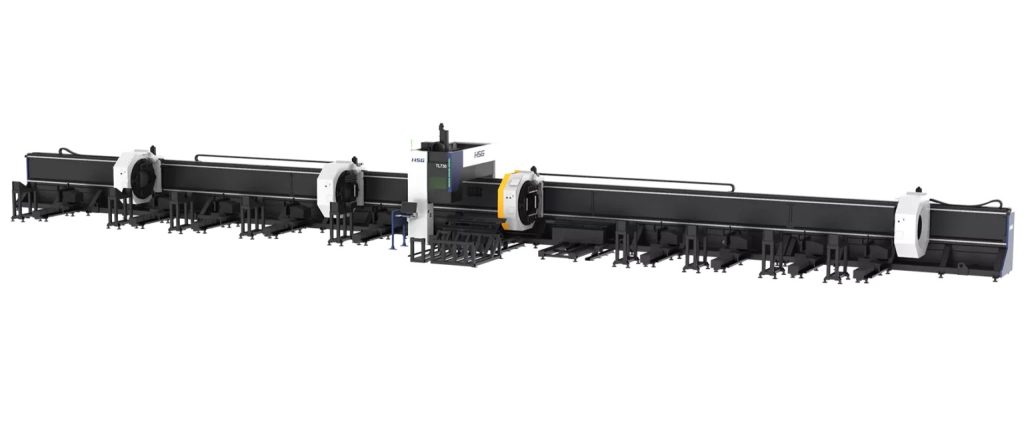
TLS HIGH-SPEED FULLY AUTOMATIC LASER CUTTER
- Heavy Duty Tube Processing Ability
- Innovative 4+1 Chuck Structure
- Intelligent Digital Chuck
- Bevel Processing
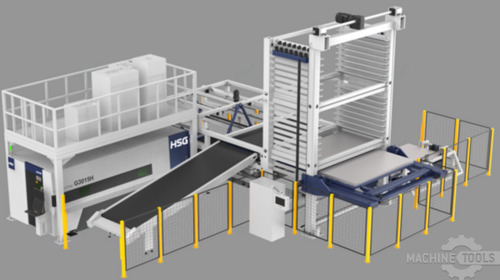
HSG-G3015H V2.0-STORE PRO3015 10 SHELF
The Hidden Data Gaps Between CAD CAM Nesting Bend Deductions and Revisions
Most rework is born in the quiet gaps: CAD has one material library, CAM nesting overrides grain direction or sheet utilization, and bending uses a different bend table than the one assumed in flat pattern. Then a revision comes in and only one side of the process updates, so the laser cuts Rev C while the brake runs Rev B.
Common failure points:
- Bend deductions stored on a programmer’s desktop instead of a shared controlled library
- Nesting changes part rotation or microjoint strategy without feeding bend intent back to programming
- Mixed units, material thickness rounding, or radius assumptions between CAD and brake tooling reality
- Revision changes pushed by email or paper travelers with no program-level lockout
Closing those gaps is less about buying a new machine and more about aligning libraries, program naming, and who is allowed to change what. When you standardize those controls, you reduce touchpoints, cut down scrap, and make onboarding easier because the system enforces consistency.
Adam Quoss on Building Laser to Brake Integration for Stable Data Flow
Stable data flow means one source of truth for geometry, bend rules, and revision status, with traceability from quote to ship. In practical terms, that’s a shared material and bend database, controlled post processors, and a release process where the shop only runs “released” programs that match the traveler and the part mark.
At Mac-Tech, when we help teams integrate cells, the difference maker is often the unglamorous work: setting up libraries, permissions, and training so operators do not have to interpret tribal knowledge at the machine. That reduces setup variability and protects uptime because the process is designed to prevent “wrong file, right job” mistakes.
If you are standardizing tooling and brake consumables as part of that alignment, having a consistent brake tooling plan and verified setups helps the software match the physical world, not an idealized model. For teams building that foundation, our parts and tooling resources are centralized at https://shop.mac-tech.com/ so the cell standard stays consistent across shifts and locations.
A Practical Sync Workflow Linking Cut Programs Bend Programs and Revision Control
The workflow that holds up under real production pressure is simple: release once, run anywhere, and lock revision drift. You want the cut program and bend program generated from the same controlled dataset, with automated naming that ties part number, revision, material, and thickness to both files, plus a shop-floor method to verify the correct revision before cycle start.
Sync workflow that works:
- Single controlled bend table per material/thickness/radius family, validated by a short coupon test and signed off
- Program package includes: nest ID, part ID, revision ID, and bend program ID, all generated from the same release event
- Traveler or barcode scan pulls only released programs, blocking “local edits” unless checked out and re-released
- Part marking on the laser includes part number and revision, so inspection and the brake can confirm fit-to-rev fast
When you implement this, changeovers speed up because operators are not hunting for files or re-proving bends that should already be known. In many shops, the first measurable win is fewer test bends and fewer “tweak cycles,” which translates directly into more predictable brake utilization.
Measurable Outcomes Lower Rework Faster Setup and Predictable First Time Fit
When laser-to-brake is synchronized, the biggest gains show up in avoided nonconformance and regained capacity. Shops commonly report a noticeable reduction in first-article iterations at the brake, fewer recuts tied to revision confusion, and faster setup because the bend program matches the cut reality on the first run.
In metrics fabrication leaders care about, the improvements are straightforward: fewer touches per job, fewer scrap parts per batch, and fewer hours lost to “figure it out” time. Once bend deductions and revision control are stable, repeat jobs become truly repeatable, and training time drops because new operators follow a consistent system rather than inheriting unwritten rules.
Next Steps for Modern Fabricators Scaling CAD CAM Sync Across Cells
Start by auditing where bend rules live and how revisions move from engineering to the floor, then fix the handoffs before you chase automation. Standardize material libraries, bend tables, and naming conventions, and enforce a release process that ties the laser and brake deliverables together.
If you want to scale beyond one cell, build a template that can be cloned: identical libraries, identical tooling assumptions, and identical shop-floor verification steps. When teams ask what is realistic in retrofit environments, the answer is usually yes, as long as you lock down the data flow and train to the same playbook across shifts.
FAQ
What ROI should I expect from laser-to-brake CAD/CAM sync?
Most ROI comes from reduced rework and faster brake setup, typically showing up as regained hours per week and fewer scrap parts per job.
How long does training take for programmers and operators?
If your libraries and release process are standardized, most teams can get competent in days, then improve over a few weeks as rules and exceptions are tuned.
Can I retrofit this, or do I need new machines?
You can retrofit in most cases; the key is aligning software, tooling assumptions, and revision control so the existing machines run consistent data.
How do I reduce uptime risk during rollout?
Run the new workflow in parallel on a small family of parts first, validate bend tables with coupons, and phase in by cell to avoid production disruption.
Will it work with mixed press brakes and lasers across brands?
Yes, as long as posts, bend libraries, and revision control are managed centrally and each machine’s outputs are validated to the same standard.
If you want to compare your current handoff points and map a stable laser-to-brake data flow, email me at aquoss@mac-tech.com or connect here: https://shop.mac-tech.com/contact/
Get Weekly Mac-Tech News & Updates

Similar Posts
RYTECH Automation: Driving Throughput and Uptime in Midwest Fabrication Operations
For fabrication leaders focused on throughput, uptime, and ROI, RYTECH automation solutions offer a practical path to higher output without proportional labor increases. Here’s how Midwest shops can leverage RYTECH systems to strengthen performance and resilience.
Mastering Precision: Prodevco’s Automated Plate Processing
Adam Quoss, VP of Sales at Mac-Tech, explores Prodevco’s automated plate processing in Mastering Precision. He offers actionable insights for decision-makers aiming to modernize fabrication operations. Emphasizing hands-on experience, Quoss highlights the benefits of automation for enhancing efficiency and precision, positioning it as essential for staying competitive in today’s market.
Phased Upgrades to Integrated Cells, Lower Risk
Learn how phased upgrades to integrated cells cut risk, modernize fabrication, and boost ROI with practical steps from Mac-Tech VP Adam Quoss.
Unlocking Automation with Ermaksan: Insights for Lean Production
Adam Quoss, VP of Sales at Mac-Tech, offers a hands-on perspective on leveraging Ermaksan technology to enhance lean production. He provides practical guidance for decision-makers aiming to modernize fabrication operations, emphasizing how automation can streamline processes, reduce waste, and boost efficiency in today’s competitive manufacturing landscape.
Hydraulic vs Hybrid vs Electric Press Brakes in High-Mix
Compare hydraulic, hybrid, and electric press brakes for high-mix shops—modernization tradeoffs, performance, and ROI insights for leaders.
CNC Control Upgrade vs New Machine Payback Signals
CNC control upgrade or new machine? Adam Quoss shares payback signals, modernization impacts, and ROI cues to guide fab leaders.