
In Midwest shops, I keep seeing the same pattern: strong standalone machines, good people, and still the floor can’t get ahead of itself. The bottleneck is usually handoffs between operations, where parts wait on carts, programming gets revised at the machine, and changeovers become the place where schedules slip and rework starts. Phased upgrades to integrated cells matter because they let you raise throughput and repeatability without betting the whole plant on a single, high-risk cutover.
Why Standalone Machines Stall Throughput and Raise Changeover Risk
Standalone machines often look efficient in isolation, but the shop loses time in the gaps: staging, WIP searches, manual routing decisions, and inconsistent setup methods between shifts. When each machine is its own island, programming and nesting rules drift, tooling standards vary, and operators build tribal knowledge that is hard to transfer. The result is longer changeovers, more first-piece adjustments, and higher downtime risk when a key person is out.
The practical fix starts by treating flow as the unit of productivity, not spindle or beam-on time. Standardizing setup practices, file naming, revision control, and job travelers reduces the hidden changeover tax and makes your future automation predictable. When those basics are stable, any later integration step delivers measurable gains instead of automating chaos.
Insight from Adam Quoss on Phased Upgrades and Lower Risk Transitions
A phased roadmap reduces risk because every stage has a clear success metric and a contained scope: one cell, one family of parts, one repeatable workflow. I’ve watched shops try to jump straight from standalone machines to a fully integrated line, and the project fails for a simple reason: too many variables change at once, so the team can’t isolate what caused downtime or quality issues.
Common failure points:
- Multiple programming standards across machines and shifts, causing revision mismatches at the control
- Tooling and consumable variation that changes cut quality and first-piece results between operators
- No defined WIP rules, so parts arrive at the next step in the wrong order or incomplete
- Training concentrated on one “super user,” leaving gaps that show up on nights and weekends
At Mac-Tech, the lowest-risk implementations are the ones where we sequence controls, material handling, and training to match the shop’s maturity. That means proving data capture and standard work first, then adding targeted automation where it removes touchpoints and stabilizes changeovers.
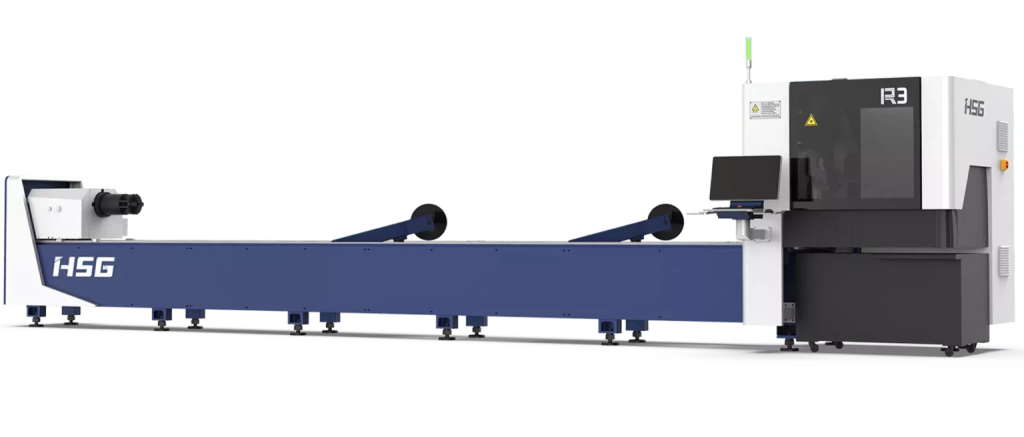
R3 PLUS-TUBE FIBER LASER CUTTING MACHINE
- Standard container transport
- Automatic loading and unloading
- HSG-X Bus control
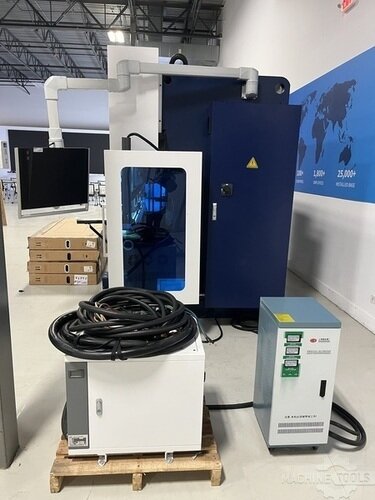
HSG HC1703
Roadmap Stage 1 Standardize Work, Data Capture, and Quick Wins
Stage 1 is about making today’s machines behave like a system, even before you physically connect them. Lock down programming release rules, revision control, and setup sheets so operators aren’t troubleshooting upstream decisions at the control. Add simple data capture for run time, changeover time, and first-piece quality so you can quantify where the cell will pay back.
Quick wins usually come from reducing variability: consistent tooling, defined clamp and datum strategies, and standard setup sequences that cut changeover minutes every time. If you need a simple place to start, build a repeatable consumables and tooling kit per machine type and tie it to job documentation so onboarding gets easier and first parts come off right sooner. For many shops, this stage alone can free hours per week by eliminating “search and fix” time and reducing first-article scrap.
Roadmap Stage 2 Link Machines into Integrated Cells with Targeted Automation
Stage 2 is where you connect the dots: one upstream process feeding the next with fewer manual decisions and fewer touches. Start with a single part family that repeats often, then link machines through a controlled handoff that can be measured, like load/unload assistance, part sorting, or a staged queue that follows a defined priority rule. Keep the automation targeted: automate the handoff that causes the most waiting, rework, or safety exposure.
Integration also means aligning control workflows so the right program, right revision, and right parameters arrive at the machine without manual USB transfers or last-minute edits. When shops source components for cell buildout, I often point them to a centralized place to manage standardized accessories and replacement items so downtime doesn’t spike after integration, such as https://shop.mac-tech.com/. For some shops, digital work instructions and operator-guided workflows can also be reinforced through supporting platforms like https://vayjo.com/ when the goal is repeatable execution across shifts.
Outcome Metrics for Each Phase OEE, Quality, Lead Time, and Safety Gains
If you can’t measure it, you can’t defend the next investment, so each phase needs scorecards that operators and leadership both trust. In Stage 1, the most visible improvements are changeover time reduction, fewer first-piece iterations, and more stable daily output because jobs stop getting “stuck” between departments. In Stage 2, you should see fewer touchpoints per part, lower WIP, and shorter lead time because the cell runs as a managed flow instead of a set of disconnected optimizations.
Metrics I expect shops to track:
- OEE components: planned vs unplanned downtime, changeover time, and speed loss by job family
- Quality: first-piece yield, scrap rate, and rework hours per week
- Lead time: queue time between operations and WIP turns within the cell
- Safety: forklift trips eliminated, lift assists added, and near-miss reduction tied to material movement changes
When you sequence upgrades this way, you are not guessing at ROI. You are proving it in hours saved, fewer schedule disruptions, improved repeatability, and faster onboarding because the process is documented and consistent.
Next Steps for Modern Fabricators Building a Repeatable Cell Expansion Plan
Pick one product family and map the current-state flow from program release to shipped part, then identify the single handoff that causes the most waiting or rework. Build Stage 1 standards around that family first, including setup sheets, tooling rules, and basic performance tracking that operators can maintain without extra overhead. Once the data shows stability, design Stage 2 integration only for that flow, then replicate the pattern to the next family.
If you are planning installs and training, schedule them as production events, not IT events, with clear acceptance tests like changeover minutes, first-piece pass rate, and target output per shift. In the real world, the best transitions also include short, role-based training blocks so maintenance, operators, and programmers each get what they need without stopping the whole shop.
FAQ
How fast can a phased approach show ROI?
Stage 1 often shows measurable gains within weeks through changeover reduction and fewer first-piece corrections; Stage 2 typically validates ROI after one stable production cycle for the chosen part family.
How much training time should I plan per phase?
Plan short, role-specific sessions: operators need standardized setup and recovery steps, while programmers and leads need release rules and revision control; most shops can ramp without pulling everyone off the floor at once.
Should I retrofit existing machines or buy new for cell integration?
Retrofits can be a strong first step if the machines are mechanically sound and controls can support consistent program handling; new equipment makes sense when reliability and repeatability limits would cap the cell’s gains.
How do I reduce uptime risk during integration?
Keep scope tight to one cell and one part family, run parallel processes until metrics stabilize, and define rollback procedures so production can continue if an integration point needs adjustment.
Will different brands and controls work together in a cell?
Yes, but you need disciplined standards for file naming, revision control, tooling, and handoff rules so the cell behaves consistently regardless of machine brand.
What changes management habits make or break cell upgrades?
Clear ownership of standards, daily review of the same metrics, and enforcing “no edits at the machine” rules prevent drift and protect the gains you paid for.
If you want to walk through a phased roadmap for your shop, email me at aquoss@mac-tech.com and we can start with your current bottleneck and a practical plan from there: https://shop.mac-tech.com/contact/
Get Weekly Mac-Tech News & Updates
