
I’m Kyle Bialozynski, a Sales Executive at Mac-Tech, and I’ve spent a lot of miles visiting Midwest job shops where the mindset is simple: keep the parts moving, keep the machine cutting, and do not waste steps. One of the most common headaches I see is not the fiber laser itself, it’s everything around it: manual sheet handling, staging the next job, and cut parts piling up so the brake crew is waiting. In winter, that pain gets worse when staffing is tighter, forklifts move slower, and a single missed setup can snowball into lost uptime.
Map Your Current Bottlenecks in Loading, Staging, and Cut Part Flow
Most job shops think they need more laser power when the real bottleneck is handling time between sheets and what happens after the cut. If your operator is spending big chunks of the shift hunting sheets, moving drops, or babysitting a changeover, the laser is not the constraint, the flow is. The first step is mapping where sheets sit, how many times they get touched, and how long the laser waits for the next load.
A practical fix is to set a clear staging rule: next two sheets ready, scrap plan defined, and cut parts routed to a known zone for bending or hardware. When we do this before automation, you can often gain measurable throughput without buying anything, and it also tells you whether a load-unload or a tower will actually pay back. Once that map is clear, we can size an HSG fiber laser automation package around your real choke points instead of guesses.
Compare Load-Unload and Tower Automation by Setup Time, Uptime, and Daily Throughput
A load-unload system is usually the simplest step into automation for a small team because it reduces forklift trips and keeps the laser cutting while the next sheet is staged. For many job shops, that means faster changeovers, fewer sheet touches, and more predictable shift output with one operator floating between tasks. Load-unload shines when you run a handful of materials and thicknesses per day and want quick wins without a big material library.
A tower earns its keep when your mix is wide, you run a lot of repeats, and you want lights-out capability with multiple materials on deck. It’s less about raw speed and more about uptime, scheduling freedom, and not losing an hour because the wrong sheet is staged. In HSG terms, a tower is a material management system as much as it is an automation add-on, and that is why it can outperform load-unload in real-world daily throughput when job switching is frequent.
Decision points I use on shop visits:
- If your laser waits on material more than 30 to 60 minutes per shift, load-unload is often the quickest ROI
- If you change materials many times per day and carry a lot of repeat work, a tower starts making more sense
- If you want unattended cutting, a tower plus part strategy is usually more reliable than carts and guesswork
- If floor space is tight, load-unload can fit where a tower cannot
Build a Labor and Skill Coverage Plan for Unattended Cutting Without Surprises
Unattended cutting is not magic, it is planning and coverage so the machine does not stop for a simple reason like a tipped part, a bad remnant, or a blocked unload. A small team can do this well, but you need clear roles: who stages material, who verifies programs, who checks first-piece quality, and who responds if the system alarms. The goal is fewer hero moments and more repeatable routines.
Day to day, this looks like training operators to trust the automation while still doing the basics: nozzle checks, lens and window inspection, and quick verification of sheet thickness and grade. For HSG fiber lasers with automation, you also want a standard checklist for air quality and pressure, and a simple PM habit so you are not chasing weird cut quality issues at 2 a.m. A good rule is to cross-train two people to cover the cell so vacations and sick days do not kill uptime.
Lock In Repeatability Across Materials With Reliable Sheet ID, Program Control, and Part Sorting
The fastest way to ruin ROI is cutting the wrong material or mixing parts from different jobs in the same bin. When you add load-unload or a tower, the process needs stronger controls because the operator is not staring at every sheet and every part the whole time. Repeatability is what lets you schedule confidently and keep bending, welding, and hardware fed without firefighting.
Practically, this means consistent sheet labeling and a simple program approval flow so only the correct revision runs. If your part mix is heavy, you also need a sorting plan, even if it is simple: dedicated pallets, job bins, or a cart per work order so parts do not migrate. When customers ask where to start, I point them to building standardized consumable checks and a clean digital job packet, then adding automation once the basics are stable. For tooling and consumable support that keeps the cell consistent, you can also source shop essentials through https://shop.mac-tech.com/.
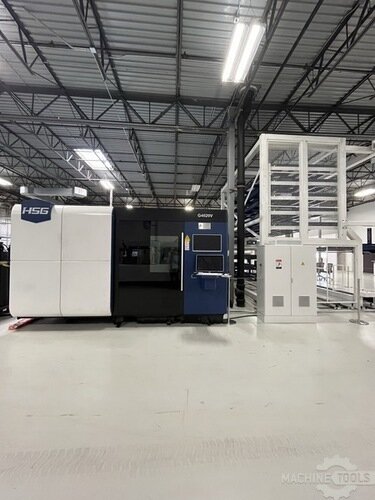
HSG G4020V 6G 30KW + STORE 4020 6
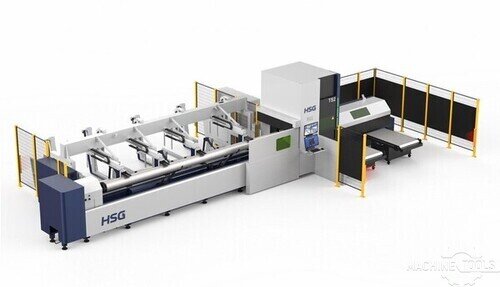
HSG TS2 HIGH SPEED TUBE FIBER LASER CUTTING MACHINE
Choose the Right Footprint and Material Handling Layout for Your Floor, Forklifts, and Future Cells
Footprint is not just the laser and the automation, it’s forklift lanes, sheet staging, finished part staging, and where skeletons or drops go. Load-unload typically needs clear infeed and outfeed room plus safe zones so the operator can stage sheets without fighting traffic. Towers demand more vertical and floor space, but they can reduce overall clutter by replacing scattered rack locations with one organized storage point.
At a high level, plan for stable power, clean dry air, and room for service access around the laser and automation. I also like to see a defined material path that does not cross your bend cell entry, because crossing traffic is where sheets get damaged and jobs get mixed. If you are thinking about adding future cells like a press brake upgrade, welding, or tube and pipe processing, design the layout now so you are not redoing the floor plan later, and this is where a quick virtual review can help using tools like https://vayjo.com/ for sharing layouts and quoting packages cleanly.
Next Steps to Validate ROI and Scale Automation as Your Mix and Volume Change
ROI is not just labor reduction, it’s increased uptime, smoother scheduling, less rework, and the ability to quote tighter lead times. I like validating ROI with three numbers: current cut hours, current handling hours, and how often the laser is waiting on the next sheet or the next program. Then we model what happens when load-unload removes touches, or when a tower reduces changeover downtime and enables unattended runs.
A smart growth plan is phased: start with a fiber laser that fits your real work envelope, add load-unload if handling is the pain, and move to a tower when your material mix and repeat volume justify it. HSG automation packages let small teams scale without overbuilding on day one, and we can also talk trade-ins and financing so you are not stuck waiting years to modernize. If you want to start comparing options quickly, I usually send customers a short checklist and a few package examples from https://shop.mac-tech.com/ to ground the conversation in real configurations.
FAQ
Should I upgrade from plasma to a fiber laser before I automate?
Most shops see a big jump in cut speed and cleanup reduction with fiber first, then add automation once the flow is proven.
When does load-unload make more sense than a tower?
When you want faster changeovers and less forklift time but do not need multiple materials staged for long unattended runs.
When is a tower the better long-term move?
When you switch materials often, run repeat jobs, and want true unattended cutting with better scheduling control.
What should I expect for footprint, power, and air in plain language?
You need solid electrical service sized to the laser, and clean dry compressed air with stable pressure so cut quality stays consistent.
How long does training usually take for operators to adopt automation?
Most teams get comfortable in days, then get faster over a few weeks as checklists and staging habits become routine.
What maintenance habits keep winter reliability up?
Keep air dry, stay on top of filters and optics checks, and do small scheduled PM instead of waiting for a quality issue to force downtime.
Can Mac-Tech help with financing or trade-ins?
Yes, we can walk through trade-in value and financing structures so the payment lines up with the productivity gain.
If you want me to sanity-check your layout and help you decide between load-unload and a tower, reach out anytime at kyle@mac-tech.com or 414-704-8413, or browse options at https://shop.mac-tech.com/.
Get Weekly Mac-Tech News & Updates
