
I’m Adam Quoss, VP of Sales at Mac-Tech (aquoss@mac-tech.com), and I spend most weeks on Midwest shop floors where the same decision keeps coming up: do we modernize the CNC control or bite the bullet on a new machine. The biggest bottleneck I see is not spindle time, it is the programming and setup handoffs that stall work between engineering, the operator, and the next process. When controls are outdated, those handoffs multiply, changeovers take longer than they should, and downtime risk becomes the hidden cost that wrecks schedule reliability.
Spotting Payback Red Flags in Aging CNC Controls on Indiana Shop Floors
The first payback red flags are rarely dramatic failures; they are consistent slowdowns like long boot times, unreliable homing, drip-feeding workarounds, and operators avoiding certain features because they do not trust them. In Indiana shops running high-mix fabrication, these issues show up as extra touchpoints per job, more prove-outs, and rework from inconsistent starts or lost offsets.
Common payback red flags:
- Frequent battery, encoder, or axis fault resets that steal 10 to 30 minutes per incident
- Programs split across multiple files due to memory limits or unstable DNC drip feed
- Manual offset hunting after tool changes, creating first-piece scrap and extra inspection
- No modern connectivity for revision control, forcing USB sneaker-net and wrong-rev cuts
The practical fix is not always a new machine; it can be a control retrofit that restores stable servo interface, modern storage, and networked program management so jobs flow with fewer interruptions. When those red flags disappear, you typically see faster changeovers, fewer wrong-rev events, and more predictable uptime that schedulers can actually trust.
Separating Control Limits from Mechanical Wear Before You Quote a New Machine
Before anyone quotes a replacement, I want to isolate whether the limitation is control-side (processing, I/O, feedback handling, memory, communications) or mechanical (ballscrews, ways, spindle bearings, backlash, thermal growth). Too many “worn-out machine” assumptions are really “can’t hold process because the control can’t manage it consistently,” especially on equipment that is mechanically serviceable.
A simple approach is to run repeatability checks and compare mechanical indicators (backlash, axis following error, spindle runout) against symptoms like alarm frequency, lost parameters, or inconsistent tool length behavior. If the iron is fundamentally solid but the control is the source of instability, a retrofit can recover repeatability and reduce rework without the footprint, power, and lead-time hit of a new machine. At Mac-Tech, the install reality is that integration and commissioning time is the swing factor, so we plan around production windows and prove out the motion and I/O systematically to avoid surprises.
What to Measure First to Build a Payback Case Without Guessing
If you measure the right three things for two to four weeks, you can stop guessing on ROI: downtime minutes by cause, average changeover time, and first-piece yield. Those metrics translate directly into capacity, schedule risk, and scrap cost, and they make the upgrade vs replace conversation objective instead of emotional.
Start with these shop-floor measurements:
- Downtime log with cause codes: control faults, program transfer, homing, tool change recoveries
- Changeover time: last good part to first good part, including proving out and offset dialing
- Quality hit rate: first-piece scrap and rework hours tied to setup and control behavior
- Operator touches per job: how many manual interventions from load to cycle start
Once you have that baseline, you can estimate payback by converting hours saved into available machine hours and translating scrap/rework into real dollars. A control upgrade often pays back by removing friction: fewer touchpoints, faster program loading, better repeatability, and easier onboarding of operators who are used to modern interfaces. For program workflow and shop connectivity planning, it helps to review control and software options up front at https://shop.mac-tech.com/.
Upgrade vs Replace Decision Matrix Based on Uptime, Throughput, and Risk
My decision matrix starts with risk, because a “faster” machine that cannot be delivered, installed, and ramped without disruption can lose to a retrofit that stabilizes production quickly. If the shop’s constraint is uptime and changeover speed, control modernization often yields a larger near-term throughput gain than raw horsepower.
How I decide:
- Upgrade when: the iron is mechanically sound, but you lose hours to alarms, program handling, and inconsistent setup behavior
- Replace when: mechanical wear prevents tolerance capability, or the process requires rigidity/speed the platform cannot provide
- Hybrid when: you need one new machine for capacity, plus retrofits to stabilize legacy cells that feed it
In practical terms, a retrofit reduces operational risk when it standardizes the operator experience across machines, cuts training time, and supports consistent program revision control. A new machine wins when the part mix demands a different platform entirely (travel, rigidity, automation envelope) and the economics justify the lead time and ramp-up.
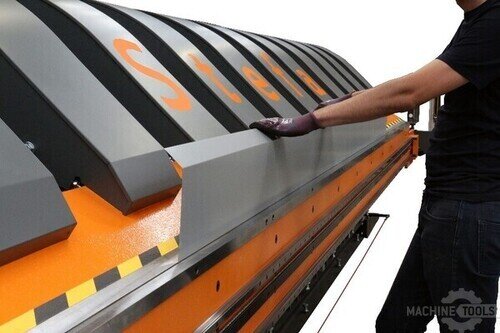
STEFA VH315

STEFA SLIT-BEND FOLDER WITH BUILT-IN SHEAR
Payback Signals That Show When a Control Upgrade Beats a New CNC Machine
The strongest signal that an upgrade beats replacement is when the majority of “lost time” happens before and after the cut: loading programs, proving out, chasing offsets, recovering from faults, and coordinating handoffs. If those losses add up to even 3 to 5 hours per week per machine, a retrofit that removes those frictions can generate capacity faster than waiting months for a new asset.
Another signal is when experienced operators are the only ones who can run a machine “without drama.” When modern controls and workflows reduce tribal-knowledge dependence, onboarding gets easier and repeatability improves, which shows up as fewer first-article loops and less inspection churn. In several Indiana shops, the payback is not just cycle time, it is fewer bad starts, fewer crashes from recoveries, and more consistent weekly output.
Next Steps for Indiana Fabricators Planning a CNC Modernization Roadmap
Start by grouping machines into families by mechanical condition and production role: core capacity, secondary ops, or specialty work. Then prioritize the machines that are schedule-critical and suffer the highest downtime minutes from control-related issues, because those deliver the fastest and safest ROI.
From there, define a modernization roadmap that standardizes interfaces, program management, and training across the shop so you are not supporting five different generations of workflow. When Mac-Tech is involved, the key integration steps are I/O mapping, servo and feedback validation, safety interlocks, and a structured prove-out plan that protects production while accelerating adoption. If you want to explore control upgrade components and modernization-ready options, https://shop.mac-tech.com/ is a good place to start, and for digital workflow considerations that impact programming and quoting, https://vayjo.com/ can be a useful reference.
FAQ
How fast can a CNC control upgrade pay back versus buying new?
If the bottleneck is downtime, changeovers, or program handling, payback can come from hours recovered per week rather than cycle-time gains alone.
How much training time should I plan for operators after a control retrofit?
Plan for short focused training and supervised first jobs; the goal is fewer touchpoints and faster onboarding compared to legacy interfaces.
When is a new CNC machine the only rational option?
When mechanical wear or platform limits prevent tolerance capability, or when you need a different envelope, rigidity, or automation integration than the current iron can support.
Will a retrofit work with my existing servos, feedback, and I/O?
Compatibility depends on the machine platform and components, so we validate servo/feedback interfaces and I/O mapping before committing to scope.
What is the biggest uptime risk during a control upgrade?
Commissioning and prove-out are the risk points, which is why a planned integration window and structured test plan matter as much as the hardware.
How do I manage change control so the shop does not slip back into bad habits?
Standardize program revision control, setup checklists, and operator workflows so the improved process is repeatable across shifts.
If you want a quick, shop-specific upgrade vs replace payback read, email me at aquoss@mac-tech.com or reach out here: https://shop.mac-tech.com/contact/
Get Weekly Mac-Tech News & Updates
